If your Samsung dishwasher stops mid-cycle and shows OC or 5C on the display, the machine is telling you the same thing: it tried to pump the water out and couldn't. The two codes are essentially twins. Newer models tend to show 5C, older ones show OC, and both point to a drainage problem.
The good news is that most drainage failures come from a handful of simple causes, and a few of them you can check yourself in under fifteen minutes with no tools.
What the OC and 5C codes actually mean
During and after each wash cycle, the dishwasher runs a drain pump to push dirty water out through the drain hose. A sensor watches the water level inside the tub. If the water level doesn't drop the way it should within a set time, the control board assumes the water isn't leaving and throws the OC or 5C code to protect the machine from overflowing.
So the code doesn't tell you why the water isn't draining, only that it isn't. The cause is almost always one of these:
- A clogged filter or sump area inside the tub
- A kinked, clogged or frozen drain hose
- A blocked connection at the sink drain or garbage disposal
- A failed drain pump or a stuck check valve
- Less often, a wiring or control board fault
Step 1: Clean the filter and sump
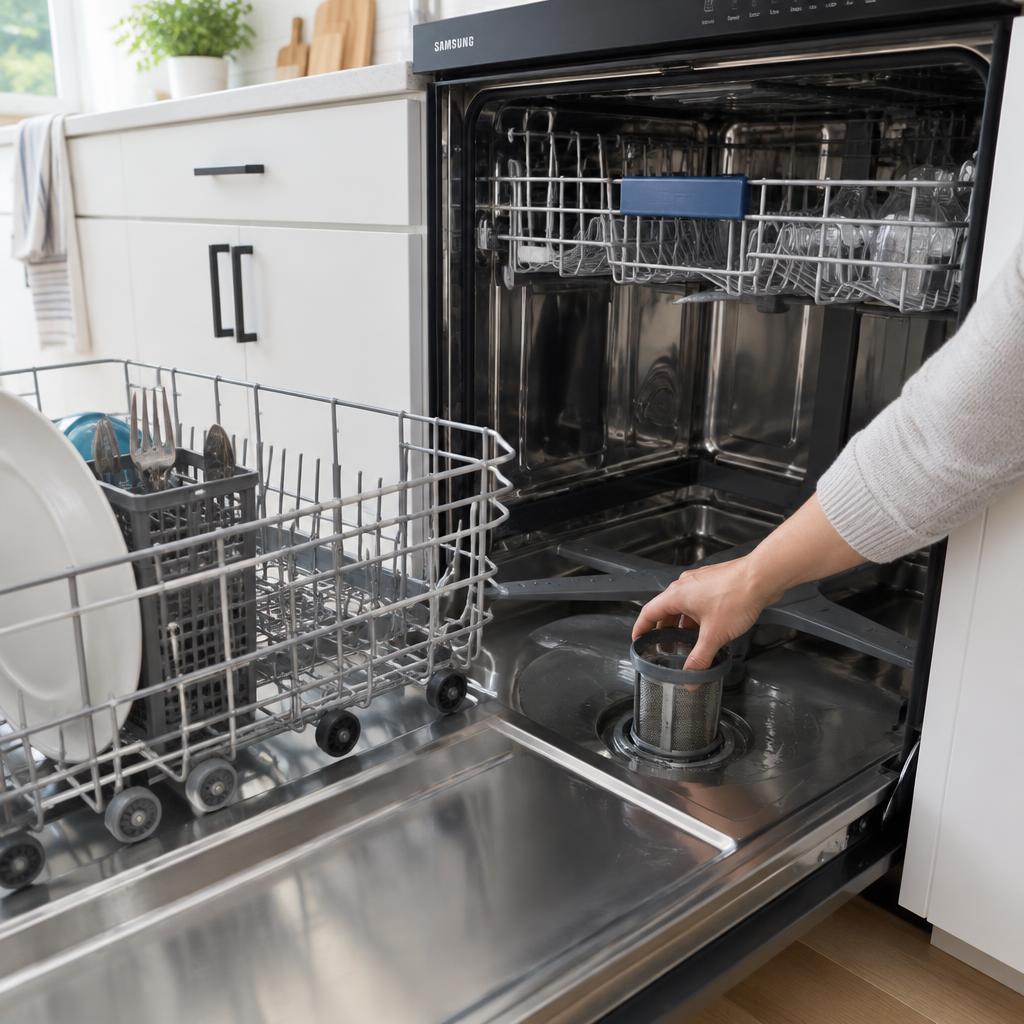
This is the most common fix and the easiest to try. Open the door, pull out the bottom rack, and look at the floor of the tub. Samsung dishwashers have a cylindrical filter that twists out counterclockwise, plus a flat mesh filter underneath it.
Remove both, rinse them under hot water, and scrub away grease and food debris with a soft brush. While the filter is out, look down into the sump (the well the filter sits in) and scoop out anything you find: bones, glass shards, fruit stickers and twist ties are the usual suspects. Reassemble everything and run a short cycle.
Step 2: Check the drain hose
The drain hose runs from the back of the dishwasher to the plumbing under your sink. Pull the dishwasher out a few inches if you can, and check the hose along its whole length:
- Kinks: a sharp bend, often where the hose leaves the cabinet, can choke the flow completely.
- High loop: the hose should rise up high under the counter before dropping to the drain. If it lies flat on the cabinet floor, dirty sink water can flow back into the dishwasher.
- Clogs: disconnect the hose at the sink end (have a towel and a shallow pan ready) and check for a blockage. Grease builds up inside these hoses over the years.
Step 3: Check the sink connection and garbage disposal
If the dishwasher drains into a garbage disposal, a very common culprit is the knockout plug. New disposals ship with a plastic plug sealing the dishwasher inlet, and if the installer forgot to knock it out, the dishwasher has nowhere to drain. If your disposal was recently replaced and the code appeared right after, this is almost certainly the problem.
Also run the disposal for thirty seconds before starting the dishwasher. A disposal full of food waste blocks the dishwasher's drain path just as effectively as a clog in the hose.
Step 4: Listen to the drain pump
Start a cycle and listen at the bottom of the door when the machine tries to drain. You should hear a steady hum and the sound of water moving. What you hear tells you a lot:
- Normal hum, no water movement: the pump is running but the path is blocked, or the impeller is broken.
- Grinding or buzzing: something hard is jammed in the pump, or the pump motor is failing.
- Silence: the pump isn't getting power, or it has failed completely.
Replacing a drain pump means pulling the dishwasher out, tipping it or removing the base panel, and dealing with wiring and hose clamps. It's a reasonable job for an experienced DIYer, but most people prefer a technician at this point.
Step 5: The check valve and air gap
Samsung dishwashers have a small rubber check valve (sometimes called a backflow flapper) where the drain hose meets the sump. Its job is to let water out and stop it coming back. If it sticks shut or a piece of debris wedges under it, the machine can't drain even with a healthy pump. Some installations also have an air gap device on the countertop or sink deck; if you have one, pop the cap off and clear any gunk inside.
When to reset the code
After any fix, clear the code by turning the dishwasher off at the breaker or unplugging it for five minutes, then power it back up and run a short cycle. If the code stays gone, you're done. If it returns within a cycle or two, the underlying problem is still there.
When to call a technician
Call for service when the filter, hose and disposal are all clear and the code keeps coming back, when the pump is silent or grinding, or when the machine drains sometimes but not others. Intermittent drainage faults often turn out to be a weak pump motor, a flaky wiring connection at the pump, or a control board that isn't sending power reliably. Those need proper diagnosis with a multimeter, and guessing at parts gets expensive fast.
A technician will also check the water level sensor itself, since a faulty sensor can report a full tub that isn't there and trigger OC or 5C with nothing actually blocked.
How to prevent the code from coming back
- Scrape plates before loading; you don't need to pre-rinse, but bones, pits and stickers have to stay out.
- Clean the filter once a month. It takes two minutes and prevents most drainage calls we see.
- Run the garbage disposal before starting a cycle if the dishwasher shares that drain.
- Once every few months, run an empty hot cycle with a dishwasher cleaner to dissolve grease in the sump and hose.
If your Samsung dishwasher is showing OC or 5C and the simple checks haven't solved it, we repair Samsung dishwashers across Metro Vancouver and the Lower Mainland, usually same-day. Give us a call and we'll get it draining again.
Related service
Need a technician?
We handle appliance repair across Metro Vancouver and the Lower Mainland. Same-day service usually available.